
Skip to content
Da Capo Inventory Documentation

Streamlining Music Teacher's Offices

  • DCI Documentation
  • Encyclopedia
Da Capo Inventory Documentation

Streamlining Music Teacher's Offices

  • DCI Documentation
  • Encyclopedia
Popular Search deletetiernyssmarentallink

Initial Setup

  • Clever SSO
  • Program Settings
  • Frequently Asked Questions including Delete
  • Two Factor Authentication (2FA)
  • Entire Site Search Feature
  • Set a Password for your new account
  • Log In to your new account
  • Set your User Preferences
  • Import Students 🎦
  • Import Instruments 🎦
  • Import Library Materials
  • Import Uniforms
  • Import Lockers
  • Switching Buildings

Inventory

  • Marking Instruments Obsolete 🎦
  • Inventory Update and Reports
  • LostInstrument.com
  • End of year
  • Assign Instruments, View and Edit Inventory & Print Contracts, Labels and Barcodes / QR Codes
  • Print Rental Contracts
  • Modify & View History of an Inventory Item
  • Repairs
  • Add Item
  • Physical Inventory
  • Barcode assign inventory
  • Find unused district inventory
  • Vendor Inventory

Enrollment

  • Custom Student Fields in Da Capo Inventory
  • Student Practice Logs and Audio Recordings
  • Barcode Ensemble Attendance
  • Points Tracking System (Varsity Letters, etc.)
  • Student Evaluation System
  • Ensemble Attendance
  • Manage Enrollment, Email Families, Print Contracts
  • Modify Student Details
  • Save copies of student adjudication sheets
  • Program Enrollment
  • Add Student
  • Parent Portal

Financials & Trips

  • Rental / Maintenance Fee Reports
  • Add/Modify a Fundraiser
  • View Fundraising Accounts and Add Deposits
  • Withdraw money from the Ensemble General Fund
  • View or Download Complete Fundraising Ledger
  • Trip Setup
  • Manage Trips

Library

  • Da Capo Inventory Systemwide Library
  • Manage Building Library
  • Add/Modify a Library Item
  • Add a library item with a Barcode scanner
  • View District Library

Lesson Scheduling and Tracking

  • Manually moving a lesson date or time
  • Lesson Settings and a narrative for teachers
  • Lesson Groups
  • Lesson Days
  • Lesson Calendar Setup
  • Lesson Periods
  • Run Schedule and Print Cards
  • Record Lesson Attendance and Notes

Lockers

  • Create New Lockers
  • Assign Lockers
  • Exporting Lockers

Supplies

  • Add/Modify Supplies
  • Manage Supplies

Suggested Equipment

  • Suggested Equipment

Department Leader Documentation

  • Parent Portal Information Dissemination
  • Director of Music – District Overview
  • District Fixed Asset Inventory
  • District Inventory and Condition Report
  • End of Year Rollover for Directors
  • What to do after your account has become activated?
    • Dashboard Setup
    • Vendor Setup
    • Teacher Access Levels
    • Suggested Feature Rollout – Tiered Functions
  • District Wide Implementation
    • Staff Rollout
    • Process of Change
    • Prior to staff rollout & Equipment

State Festival Pre-Registration

  • NYSSMA or other Adjudication Sheet Upload
  • Process Overview
  • Parent Pre-Registraion
  • Teacher Review and Approval 🎦

Community Event Calendar

  • Community Event Calendar
  • Community Event Calendar Upload Instructions

Parent Portal

  • Starting out with the Parent Portal
  • What can a parent see and do on the portal?

Communication

  • Form Collection System
  • Da Capo Inventory Direct Messaging
  • Sending Emails to Family Members
  • Email Dashboard
View Categories
  • Home
  • Help Center
  • Lesson Scheduling and Tracking
  • Lesson Calendar Setup

Lesson Calendar Setup

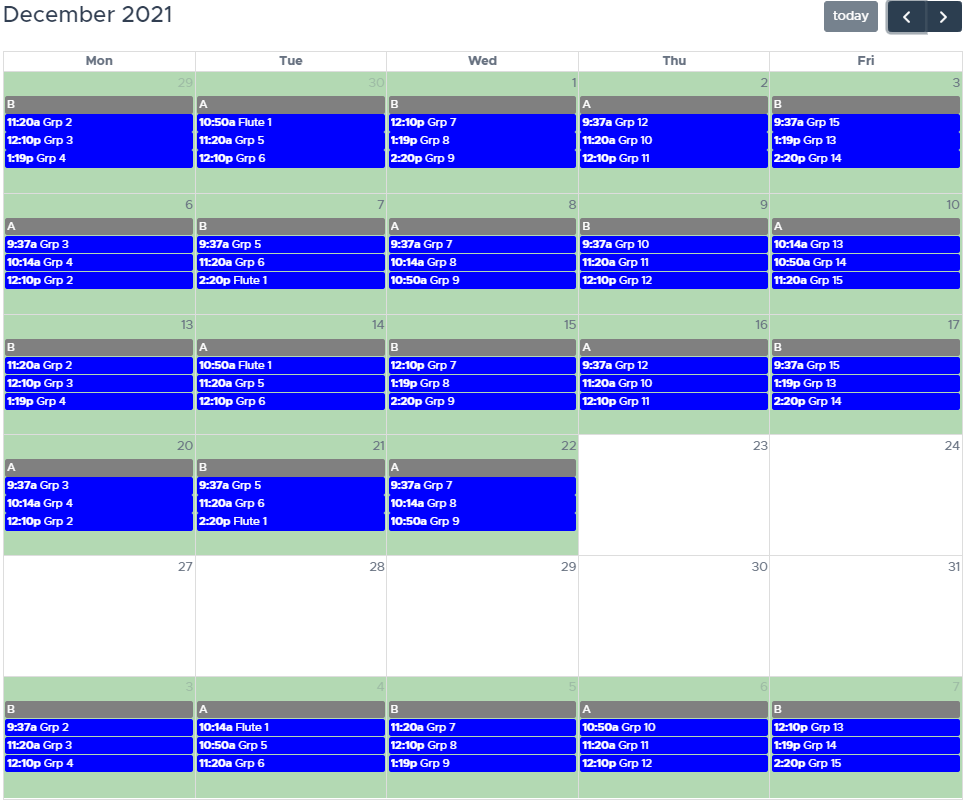
This page allows you to deselect the days that you will not be teaching. Days that are Green will have lessons scheduled. Days that are White will not have lessons scheduled. To change the color of a day, simply Click it!

💡 If any of your colleagues have already created an academic calendar, you can adopt their calendar by clicking ‘Lesson Settings’ and scrolling down to the second section. If you see a schedule that seems to be somewhere around 183 days (or fewer – due to testing), that calendar is probably close to what you’re teaching!
Is this page helpful?
Still stuck? How can we help?

How can we help?

Updated on October 3, 2022
Lesson DaysLesson Periods

Copyright © 2025 Da Capo Inventory Documentation | Powered by Astra WordPress Theme