
Record Lesson Details #
Your Teacher Dashboard now has significantly more information on it. You are now greeted with a picture of your day, including your lesson schedule and all of the students who will be attending your lessons.
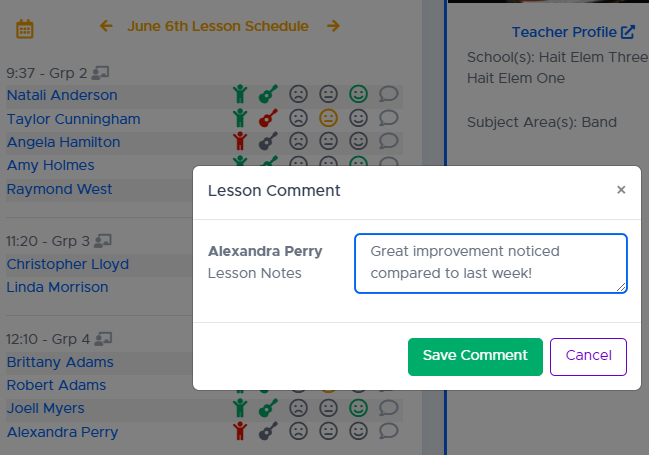
As can be seen in the image below, you can:
- Take attendance (Natali and Taylor were present, Angela was absent)
- Mark preparedness (Natali was prepared, Taylor was not)
- Mark weekly progress (Natali and Amy did great, Taylor performed at a medium level)
- Mark an optional comment (Alexandra improved greatly since last week)
- All of these historical lesson remarks can be viewed on the Student Details page. You can click the student’s name from your dashboard to go right to those details.
Lesson Notes #
You can also take notes on the lesson – which can be presented to students who scan the QR code on their lesson card.
Students will see the most recent lesson notes first, preceded by previous weeks.
