Some school districts borrow inventory from a local vendor and lend that borrowed inventory to their students. As of Fall 2022, Da Capo Inventory has a function built in to manage that borrowed inventory.
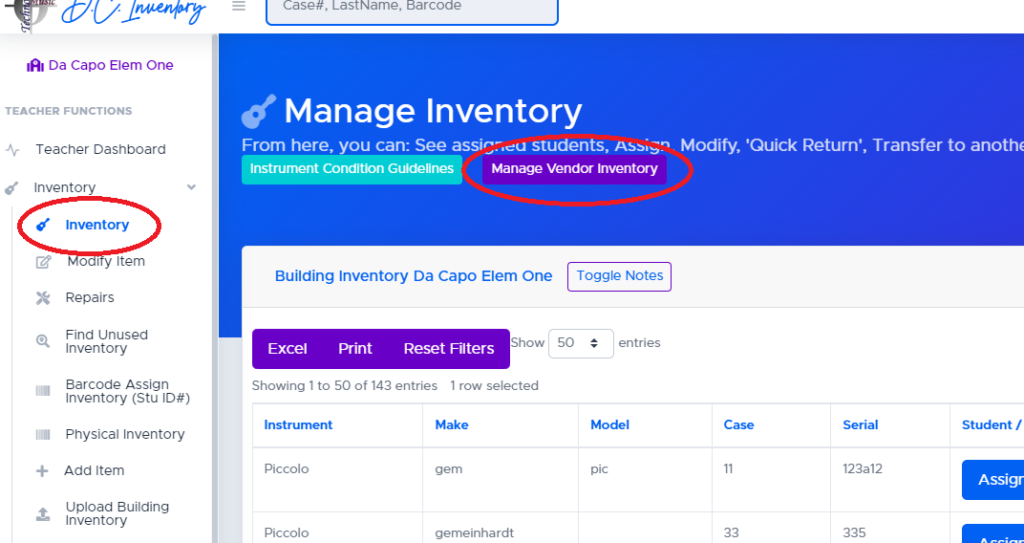
If your building has at least one ‘vendor owned’ instrument, you will see a ‘Manage Vendor Inventory’ button at the top of your inventory page.
Active Vendor Owned Inventory #
‘Active’ vendor owned inventory includes items that your building currently has in its possession. It may be assigned to a student or unassigned.
- If the item is assigned, the actions column will allow you to modify the instrument details and see its history
- If the item is unassigned, the actions column will allow you to modify the details and/or mark the item as ‘returned to vendor’
Inactive Vendor Owned Inventory #
Inactive items are listed for historical purposes only. They cannot be reactivated, and will not be listed on your inventory.
How do I add Vendor Owned Inventory #
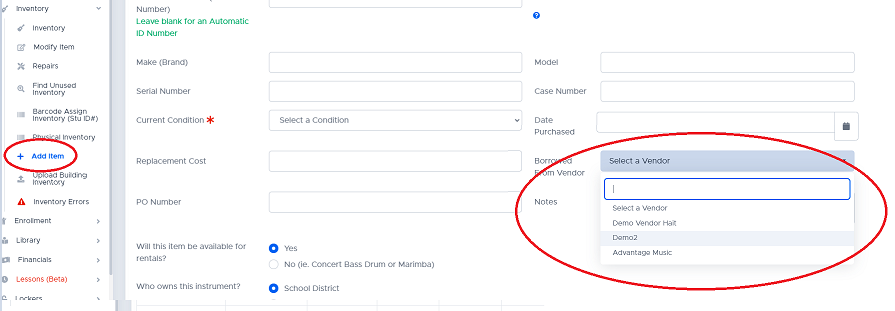
As of Fall 2022, the only way to add Vendor Owned Instruments is to add the instruments one-by-one through the Inventory –> Add Item screen. Be sure to click the ‘Borrowed From Vendor’ dropdown and select a vendor. If the vendor you’d like to select is missing from this list, your director of music will need to add the vendor to your district.