- Upon your first login, you will be brought directly to your User Profile.
- Ensure your Teacher Name, Email Address, appropriate School Names, and Courses are checked off.
- If you check off ‘Band’, you will see band students and band instruments
- If you check off ‘Orchestra’, you will see orchestra students and orchestra instruments
- If you check off ‘GM/Chorus’, you will see GM/Chorus students and GM instruments. You will also be able to select student ‘Voices’ in the Enrollment menu.
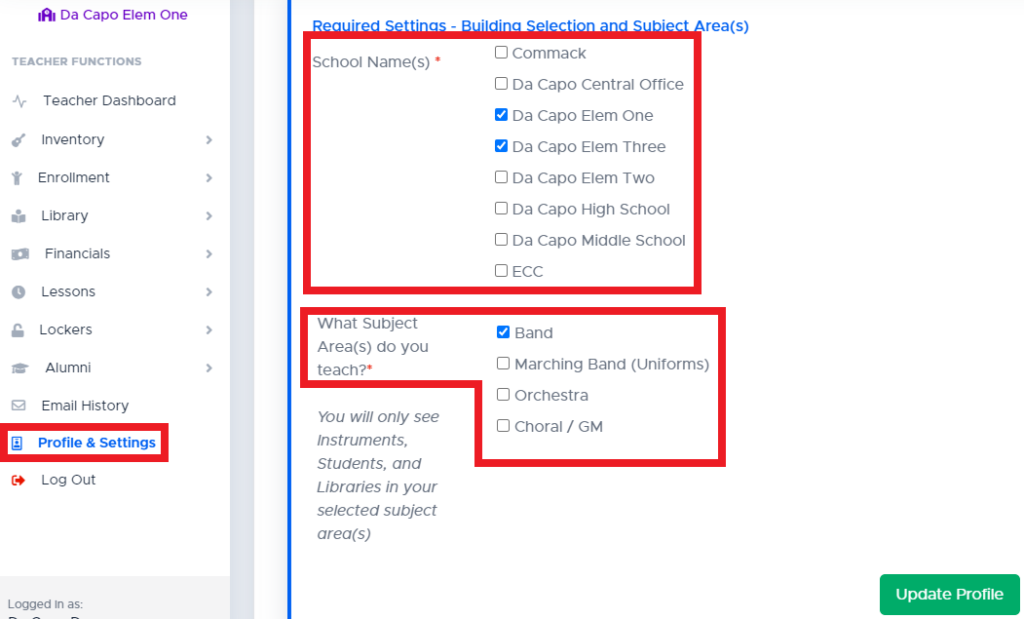
- If you are unable to select Buildings in which you teach, your administrator will have to enable that setting for you.
- Advanced: Grouping Settings (This will allow you to view a subgroup of students or email a subgroup of students from the Manage Enrollment page)
- You may be a ‘Band’ teacher. You should not make a group called band (because all of the students in your list will be band students). You should not make a group called clarinet (because you can simply search for clarinet)
- You may want to create a group called ‘NYSSMA’ for students who will be performing a solo
- Or, groups called: Chamber, Jazz, etc.
- Email Signature – If you enter a signature here, it will be added to all student/family emails that you send through Da Capo Inventory
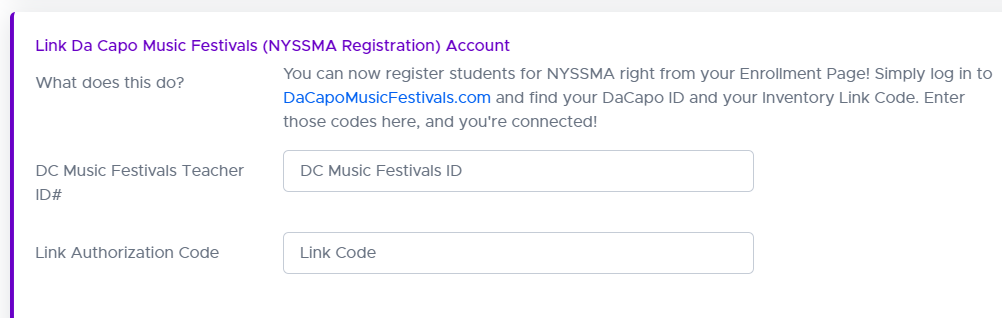
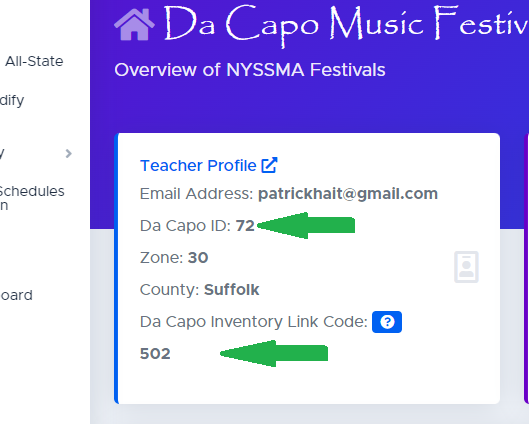
- New York Clients: You can use Da Capo Inventory to register students for NYSSMA by linking your Da Capo Inventory account to your NYSSMA Registration account! Please obtain the two pieces of information that are needed from your Da Capo Music Festivals account and enter them in the appropriate spot in your Da Capo Inventory Profile page.
What is a Passkey? #
A passkey is a modern, secure way to sign in to your Da Capo Inventory account without using a password. To create a passkey, navigate to the Password section of your Profile page.
Instead of typing a password, a passkey uses the same secure method you already use to unlock your device or browser, such as:
- Face ID or Touch ID
- Windows Hello
- A device PIN
- A trusted password manager (such as Apple Keychain or 1Password)
Passkeys are:
- More secure than traditional passwords
- Resistant to phishing
- Easier and faster to use—no passwords to remember or reset
Once a passkey is registered, you can use it to sign in on supported devices and browsers. You may register more than one passkey (for example, one on your laptop and one on your phone).
Important: Passkeys are stored securely on your device or in your authenticator/password manager. Da Capo Inventory never sees or stores your biometric information.
NY Clients: Link your NYSSMA Account #
New York Clients: You can use Da Capo Inventory to register students for NYSSMA by linking your Da Capo Inventory account to your NYSSMA Registration account! Please obtain the two pieces of information that are needed from your Da Capo Music Festivals account and enter them in the appropriate spot in your Da Capo Inventory Profile page.
Navigate to the Da Capo Inventory Profile and Settings Page and find the “Link Da Capo Music Festivals (NYSSMA Registration) Account section.