Teachers – Marking Instruments Obsolete #
The best way to delete instruments, or otherwise remove inventory items from your building is to mark them obsolete. Once an instrument is marked obsolete, your department leader can follow your district’s procedures and have the instrument removed from inventory.
The video below shows two methods of marking instruments obsolete.
- The first method is to edit the instrument (Click the purple edit icon in the Actions column), and change the condition of the instrument to Obsolete. You can also type any notes about the instrument on this screen.
- The second method is to go to the “Inventory Update and Errors” page (New in 2024!) and either SHIFT-Click or CTRL-Click a few instruments that will be marked as obsolete. Then, click the large blue edit button beside the search bar on the right. From there, change the Condition to Obsolete, and confirm that you are updating X instruments to the new condition. Once you click “Update”, those few instruments will be marked as obsolete.
Department Leaders – Removing Obsolete Instruments #
When a teacher marks an instrument as obsolete, it automatically appears on the Obsolete Instruments report, accessible to Directors of Music via the Inventory → Obsolete Instruments page. Here, you can review a list of obsolete instruments along with relevant details, and you will have the option to permanently delete an instrument from your inventory.
Important: Deleting an instrument will remove it entirely from the active inventory database. However, key historical information is retained for future reference.
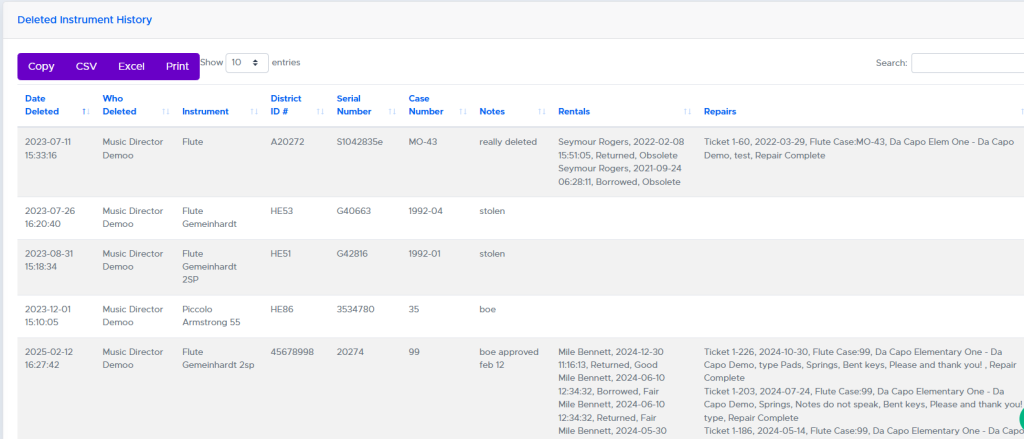
Information Retained After Deletion #
The following data points are preserved even after the instrument is deleted:
- Date Deleted: The exact date and time the instrument was removed.
- Deleted By: The name of the department leader who performed the deletion.
- Instrument Details: Including instrument type, District ID#, serial number, and case number.
- Notes: Any notes you enter during the deletion process.
- Borrowing History: A list of all students who previously borrowed the instrument.
- Repair History: A record of all repairs the instrument received.
This ensures that you always have access to a complete historical record, even as your active inventory remains up to date.